
Video schema tells Google about your videos through three required fields—name, thumbnailUrl, and uploadDate—plus either a direct video URL or an embed URL. Getting these three fields exactly right, with valid image URLs and proper date formatting, is more important than adding optional properties, since missing or incorrect required fields silently prevent your videos from appearing in rich results. Test your schema with Google's Rich Results Test before publishing to catch validation errors early.
Validate 3 Required Fields: Video Schema for SEOs, Get a Free Audit
Video schema, formally the VideoObject type from Schema.org, is a JSON-LD block that tells Google what a video is, how long it runs, and where to find it. Add name, thumbnailUrl, uploadDate, and either contentUrl or embedUrl, and your page becomes eligible for video rich results. Test the block with the Rich Results Test before you publish. That is the whole job in one paragraph; the rest of this guide covers the properties, the code, and the mistakes that get schema silently ignored.
***
TL;DR: >- Accurate thumbnail URLs must be crawlable, meet minimum size requirements, and remain publicly accessible to ensure schema validation.- Using the correct property types and formats, such as ISO 8601 for dates and durations, is essential to prevent silent validation failures.- For large video collections, a video sitemap is recommended for discovery, but JSON-LD markup remains crucial for rich result eligibility.- Properly selecting between VideoObject, Clip, SeekToAction, and BroadcastEvent depends on content control, scale, and whether the video is live.- Ensuring all required fields are correct and consistent with page content is more impactful than adding numerous optional properties or faking URLs.
***
Table of Contents
- What are VideoObject, Clip and BroadcastEvent?
- Which VideoObject properties do you actually need?
- Copy-paste JSON-LD templates for three common cases
- How do Clip and SeekToAction actually differ?
- What causes schema to get silently rejected?
- Do you need a video sitemap as well as JSON-LD?
- How do you keep schema accurate as content scales?
- What does Cited check when auditing video schema?
- Why accuracy matters more than feature completeness
- Get a free audit before you rebuild your video schema
- Where to check the rules yourself
- Sources
- FAQ
What are VideoObject, Clip and BroadcastEvent?
VideoObject is the schema type you attach to almost every video page. It sits inside a JSON-LD script tag in the page's head or body, and Google Search Central recommends JSON-LD over Microdata or RDFa because it is easier to validate and less prone to breaking when templates change.
Two other types extend VideoObject for specific jobs, and picking the wrong one is a common reason schema gets built but never earns a rich result.
- Clip marks a hand-picked segment of a longer video, such as a recipe step or a highlight from a lecture, and is the type to use when you control exactly which moments matter.
- SeekToAction does a similar job but works by pattern matching. It tells Google how to construct a URL for any timestamp, which suits long-form content where you cannot manually tag every moment.
- BroadcastEvent, nested inside a VideoObject, is what makes the LIVE badge possible. Without it, a livestream page is just a video page that happens to be updating.
Choosing between Clip and SeekToAction is really a question of control versus scale, covered in more detail further down. For now, the rule of thumb is simple: static video, use VideoObject alone; curated key moments, add Clip; long unstructured footage with a predictable URL pattern, add SeekToAction; live video, nest BroadcastEvent.
Which VideoObject properties do you actually need?
Google requires exactly three named properties plus one of two URL fields: name, thumbnailUrl, uploadDate, and either contentUrl or embedUrl. Miss any one of them and the page will not qualify for a video rich result, no matter how much other metadata you add.
The Google Search Central documentation sets these as the floor, but a floor is not a strategy. Search Engine Land's guidance on video-driven SERPs notes that description and duration are technically optional yet practically essential, because they feed the preview text searchers see and they are prerequisites for key moments to display at all.
Required properties:
name: the video's title, matching what a viewer sees on the page.thumbnailUrl: a direct, crawlable image URL, ideally offered at multiple resolutions.uploadDate: an ISO 8601 date, for example2026-03-12T08:00:00+00:00.contentUrlorembedUrl: the direct file or the player URL. Self-hosted publishers should include both where possible, since contentUrl lets Google verify the actual media bytes rather than trusting a player's response.
Recommended properties:
description: a plain-text summary, distinct from the page's meta description, that supports snippet text.duration: ISO 8601 format, for examplePT5M30Sfor five minutes thirty seconds.interactionStatistic: view counts using theWatchActioninteraction type, which some carousels use as a relevance signal.expires: an ISO 8601 date after which the video should stop being served in results, useful for licensed or time-limited content.regionsAllowed: ISO 3166 country codes, needed if the video is geo-restricted.
Formatting mistakes cause more validation failures than missing fields do. Google's own documentation is explicit that dates and durations must use ISO 8601, while Clip offsets use plain seconds, and mixing the two formats is one of the most frequent bugs developers introduce. Thumbnails also need to meet minimum dimensions and remain publicly crawlable; a thumbnail blocked by robots.txt or served behind authentication will quietly fail even though the JSON-LD itself is syntactically perfect.
Statistic to note: publishers who correct thumbnail sizing and crawlability alongside adding accurate VideoObject markup report measurable gains in impressions and click-through after implementation, which is the practical payoff of getting these formatting details right rather than treating them as an afterthought.
Copy-paste JSON-LD templates for three common cases
Below are three templates you can adapt directly: a standard video, a video with curated key moments using Clip, and a live broadcast using BroadcastEvent. Replace every placeholder URL and value before publishing, and never leave sample data in production markup.
Standard video, minimum plus recommended fields:
```
{
"@context": "https://schema.org",
"@type": "VideoObject",
"name": "How to Fit a Bike Chain in Five Minutes",
"description": "A short walkthrough showing chain fitting for a standard derailleur setup.",
"thumbnailUrl": [
"https://example.com/thumbs/bike-chain-1x1.jpg",
"https://example.com/thumbs/bike-chain-4x3.jpg"
],
"uploadDate": "2026-02-18T09:00:00+00:00",
"duration": "PT5M12S",
"contentUrl": "https://example.com/videos/bike-chain.mp4",
"embedUrl": "https://example.com/embed/bike-chain",
"interactionStatistic": {
"@type": "InteractionCounter",
"interactionType": "https://schema.org/WatchAction",
"userInteractionCount": 8342
}
}
```
Video with Clip for key moments:
```
{
"@context": "https://schema.org",
"@type": "VideoObject",
"name": "Full Kitchen Renovation Walkthrough",
"thumbnailUrl": "https://example.com/thumbs/kitchen-renovation.jpg",
"uploadDate": "2026-01-05T10:00:00+00:00",
"duration": "PT18M40S",
"contentUrl": "https://example.com/videos/kitchen-renovation.mp4",
"hasPart": [
{
"@type": "Clip",
"name": "Removing the old units",
"startOffset": 45,
"url": "https://example.com/videos/kitchen-renovation?t=45"
},
{
"@type": "Clip",
"name": "Fitting the worktop",
"startOffset": 620,
"url": "https://example.com/videos/kitchen-renovation?t=620"
}
]
}
```
Live broadcast with BroadcastEvent:
```
{
"@context": "https://schema.org",
"@type": "VideoObject",
"name": "Quarterly Product Launch Livestream",
"thumbnailUrl": "https://example.com/thumbs/launch-stream.jpg",
"uploadDate": "2026-04-10T13:00:00+00:00",
"embedUrl": "https://example.com/embed/launch-stream",
"publication": {
"@type": "BroadcastEvent",
"isLiveBroadcast": true,
"startDate": "2026-04-10T13:00:00+00:00",
"endDate": "2026-04-10T14:15:00+00:00"
}
}
```
Key points that separate a working block from a broken one:
- Every date value uses ISO 8601 with a time zone offset, never a bare date string.
startOffsetvalues in a Clip array are plain integers representing seconds, not timecodes.- The
publicationproperty, nothasPart, is where BroadcastEvent nests inside VideoObject. isLiveBroadcastmust flip tofalseonce the stream ends, or Google may keep showing a LIVE badge on a recording.
How do Clip and SeekToAction actually differ?
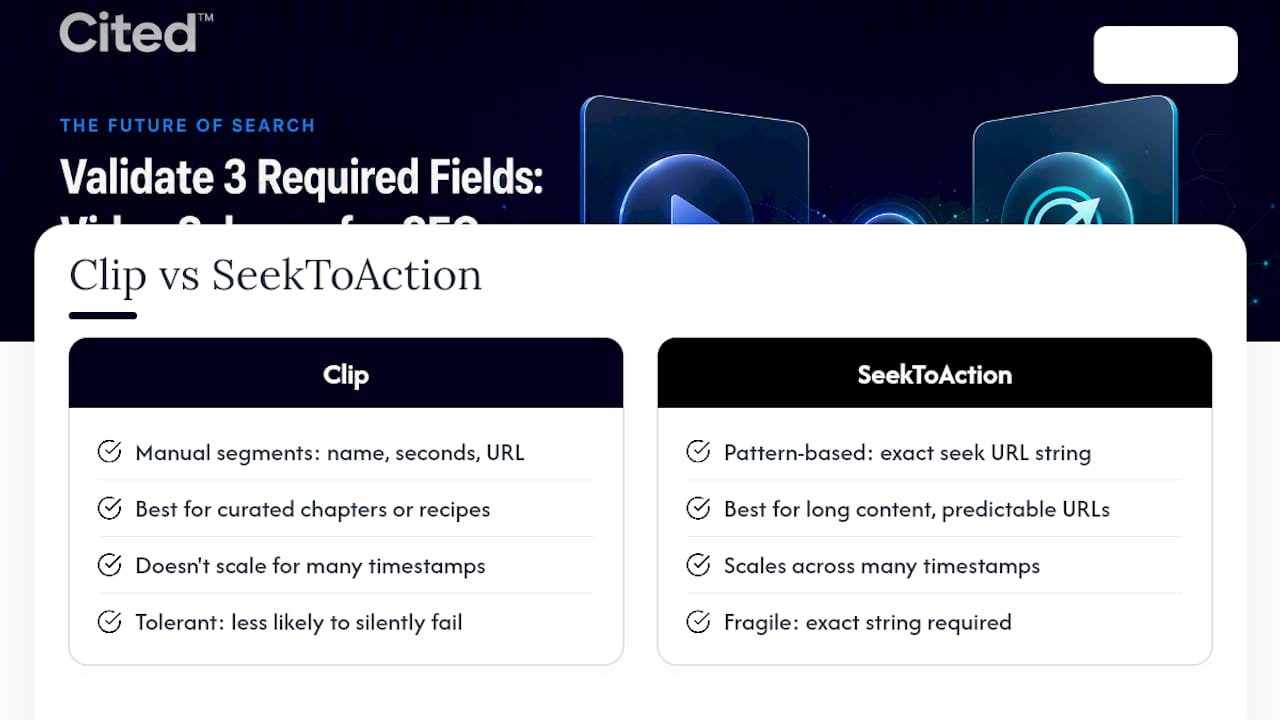
Clip suits small, hand-picked segments; SeekToAction suits long content where timestamps follow a predictable URL pattern. Both let Google jump viewers to a specific moment inside a video, but they solve the problem from opposite directions, and picking the wrong one wastes engineering time.
Clip requires you to define each segment manually: a name, a startOffset in seconds, and a url pointing to that exact moment. This gives tight control over labelling, which matters for recipe steps, tutorial chapters, or highlight reels where you want specific, curated language in the result. The trade-off is that it does not scale. Tagging fifty timestamps across a two-hour lecture by hand is not a sensible use of anyone's afternoon.
SeekToAction solves that by describing a pattern rather than a list. According to Google's structured data documentation, reliable SeekToAction implementation depends on providing the exact target pattern and an annotated property carrying the literal string required name=seek_to_second_number. Get that string wrong, even by a character, and Google's parser will not recognise the deep-link mechanism at all. This is one of the least forgiving parts of video schema: it is copy-paste syntax, not a concept you can approximate.
Pro Tip: If you are unsure whether your CMS templating will render the seek pattern correctly, build the Clip version first. It is more verbose but far less likely to silently fail, and you can add SeekToAction later once you have confirmed the underlying URL structure actually resolves to the correct timestamp.
The most common failure mode is not choosing the wrong type. It is mixing formatting conventions within the same block: using a timecode string like 00:07:25 for a Clip offset instead of the integer 445, or applying ISO 8601 duration formatting to what should be a plain seconds value. Google's parser does not guess intent. A malformed offset does not downgrade gracefully; it just gets dropped.
A second, quieter failure is inconsistency between the url in a Clip and the actual page behaviour. If the schema promises a timestamp parameter that the page does not honour, a click from search results lands the visitor at the start of the video instead of the promised moment. That mismatch does not just frustrate a viewer. It teaches Google that your key moments data is unreliable, which affects future eligibility.
What causes schema to get silently rejected?
Four errors account for most video schema failures, and every one of them passes basic JSON validation while still failing to earn a rich result. That gap, syntactically valid but functionally broken, is what makes video schema harder to debug than it looks.
- Thumbnail not crawlable. The thumbnailUrl points to an image blocked by robots.txt, served with a non-200 status, or hidden behind a CDN authentication layer. Google cannot verify what it cannot fetch.
- robots.txt blocking contentUrl. If your media files sit in a directory disallowed for crawling, contentUrl becomes worthless even though the field is populated correctly.
- Mismatched metadata between schema and page. The title in your JSON-LD says one thing; the on-page
<title>or visible heading says another. Swarmify's implementation notes flag this inconsistency as one of the most common practical failure points, and it applies just as much to duration as to titles: a schema block claimingPT10Mfor a video that actually runs six minutes will eventually be caught and can cost trust in your markup more broadly. - Incorrect duration or date format. A duration written as
5:30instead ofPT5M30S, or an uploadDate missing the time zone offset, will often be ignored rather than flagged as an error, which makes this bug particularly easy to miss.
Statistic to note: Search Engine Land's analysis of video SERP performance frames schema correctly: it functions as a translation layer that unlocks eligibility for carousels and key moments, not as a direct ranking signal for ordinary text queries. Treat rich result eligibility and organic ranking as two separate outcomes, because fixing your schema will not move a page up for a keyword it was never competitive for in the first place.
The validation workflow itself is short. Run the page through the Rich Results Test first, since it catches syntax errors and missing required fields immediately. Then check Search Console's video report a few days after publishing, because Google needs to crawl and process the page before it appears there. A manual curl request against your contentUrl and thumbnailUrl confirms both return a 200 status without redirects. Finally, search for your thumbnail image directly in Google Images; if it is not indexed there, it is unlikely to be trusted as a video thumbnail either.
Do you need a video sitemap as well as JSON-LD?
Yes, once your library grows past a few dozen videos, a video sitemap becomes the more reliable discovery mechanism, while per-page JSON-LD remains what actually earns the rich result. The two do different jobs and neither fully replaces the other.
A video sitemap uses <video:content_loc> and <video:player_loc> tags to tell Google where the raw file and the embeddable player sit, alongside supporting tags for thumbnail, title, and duration. Google's structured data documentation recommends sitemaps as the discovery path for large catalogues, since crawling thousands of individual pages for schema is slower and less efficient than reading one structured feed.
- Use a video sitemap when your library runs into the thousands, or when videos live on pages that are otherwise thin on text and might get crawled infrequently.
- Use per-page JSON-LD as the source of truth for rich result eligibility; a sitemap entry alone does not qualify a page for a rich result.
- Keep sitemap values, JSON-LD properties, Open Graph tags, and your video player's poster attribute all pointing to the same thumbnail and title. Divergence between any of these is read as an inconsistency signal, the same failure mode covered above for schema versus on-page metadata.
For most single-page implementations, JSON-LD alone is sufficient. Sitemaps earn their keep once you are publishing at volume and cannot realistically audit every page by hand.
How do you keep schema accurate as content scales?
You keep it accurate with a two-stage workflow: automated checks before deployment, and scheduled monitoring after, following a practical product page SEO checklist and roadmap to maintain quality and consistency. Manual, one-off validation works for a handful of pages; it falls apart the moment a template change affects a thousand video pages overnight.
- Pre-deploy: validate before anything goes live. Run the Rich Results Test against staging URLs, not just production, so a broken template never reaches a real page. Where you can, wire the Rich Results Test API into continuous integration alongside simple HTTP head checks confirming thumbnailUrl and contentUrl both return 200 status codes, and a robots.txt parse to catch accidental blocking.
- Post-deploy: monitor, don't assume. Check Search Console's video report weekly for the first month after a template change, then monthly once things stabilise. A sudden drop in eligible video pages almost always traces back to a template edit that broke one required field across the board.
- Handle uploadDate and expires with care. Changing uploadDate on an existing video to make it appear fresher can backfire; if the new date does not match when the content was actually published, it undermines the credibility of your other metadata. Similarly, setting an expires date without a plan to update or remove it means the video can silently drop out of results with no warning in your logs.
Pro Tip: Keep a simple spreadsheet or dashboard listing every page's uploadDate and expires value alongside its last Search Console impression count. When a page's impressions fall to zero, checking that sheet takes thirty seconds and usually reveals the answer before you touch the code at all.
What does Cited check when auditing video schema?
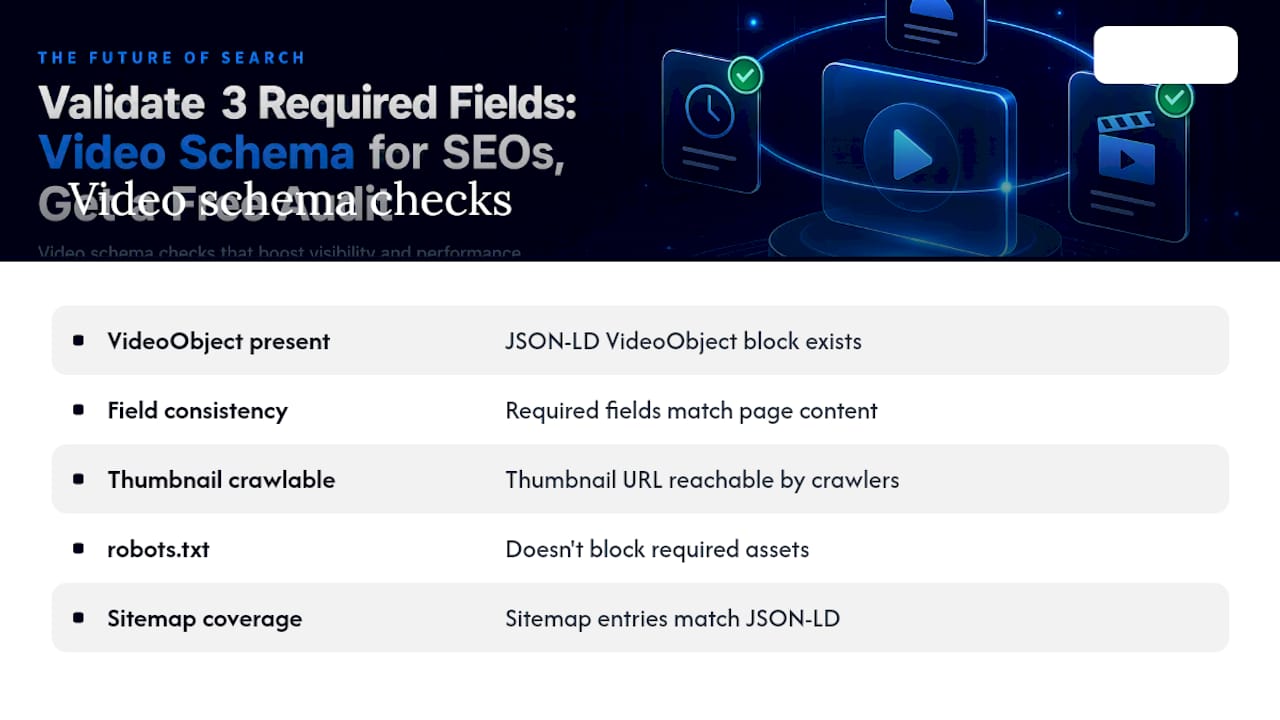
Cited's audit process treats video schema as one dimension of a wider AI visibility check, alongside technical health, authority signals, and platform coverage. On the schema side specifically, the checkpoints are practical rather than theoretical: is a VideoObject block actually present, are the required fields internally consistent with what is visible on the page, is the thumbnail genuinely crawlable, does robots.txt block anything it should not, and does sitemap coverage match what JSON-LD claims.
That checklist mirrors the common errors sites make in video schema implementation. Deeper reading on how structured data feeds AI discoverability more broadly is available on Cited Insights, alongside a related guide on technical SEO for AI citation.
Self-implementation makes sense if you have a developer comfortable with JSON-LD and a handful of video pages to fix. It makes less sense once you are managing hundreds of video URLs across changing templates, where a single CMS update can quietly break schema site-wide and go unnoticed for weeks. A free audit at cited.best/audit will tell you which category you are in before you spend a single hour on either path.
Why accuracy matters more than feature completeness
Most video schema advice pushes readers towards adding every optional property immediately: interaction counts, regions allowed, expiry dates, the full set. That is the wrong order of operations. Get the four required fields rock solid and validating cleanly first. Only then layer on description, duration, and interaction statistics, because a page with three correct properties beats a page with twelve properties where two are subtly wrong.
The temptation to fake a contentUrl for an embed-only video is worth resisting outright. If Google cannot verify the actual media, the schema is making a claim your infrastructure cannot back up, and that gap tends to surface eventually. Stable, genuinely crawlable assets matter more than a complete-looking properties list.
Schema alone is not the ceiling either. Pairing accurate VideoObject markup with transcripts and clear entity metadata gives both traditional crawlers and AI systems more to work with, which is where video discoverability is heading next.
— Tom Heaton
Get a free audit before you rebuild your video schema
This service offers a practical route to fixing video schema errors without having to reverse-engineer Google's parser requirements from documentation alone. Where a developer might spend days tracing why a thumbnail keeps failing validation, the audit checks schema presence, field consistency, and crawlability in one pass and provides a prioritised fix list.
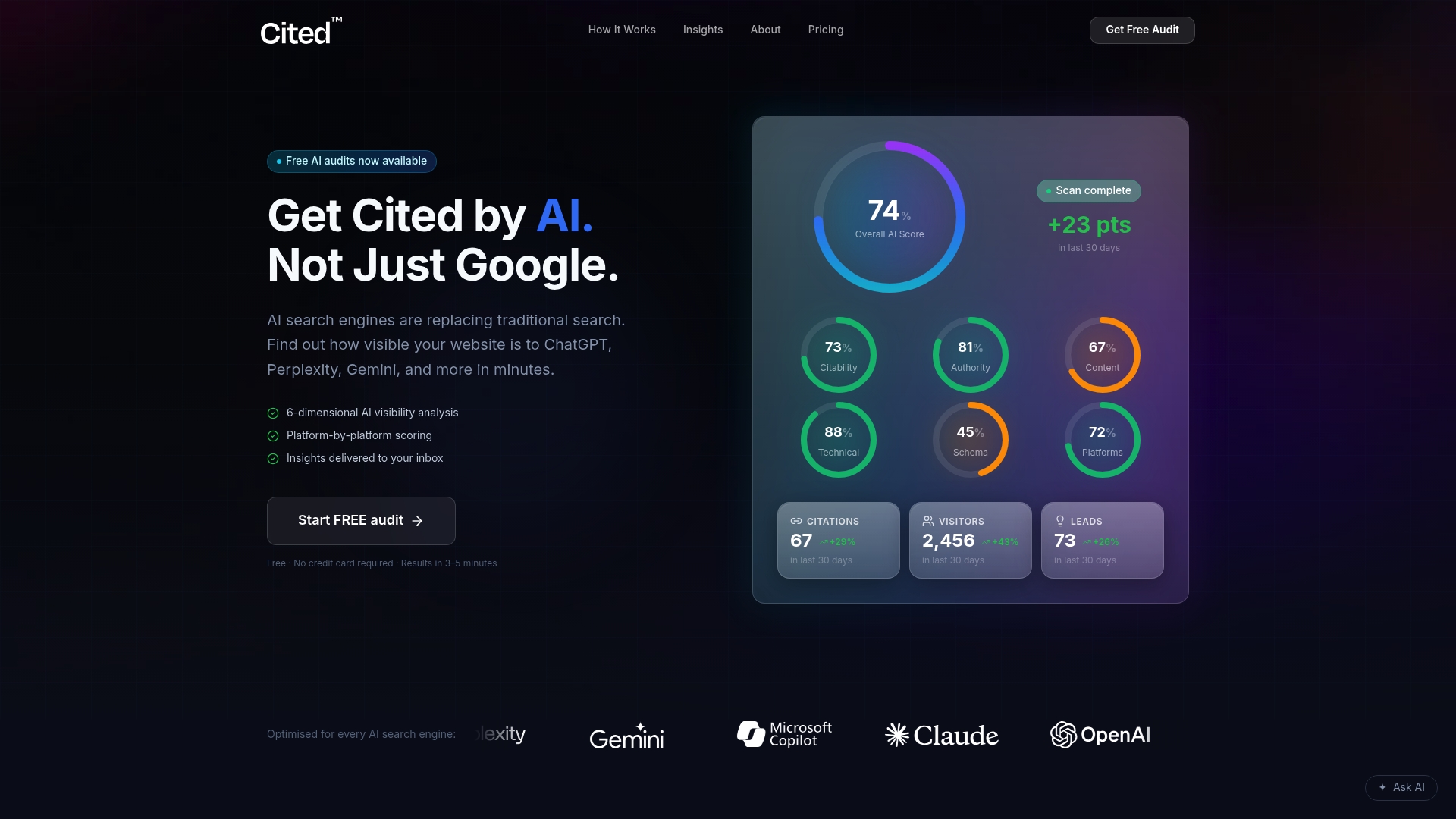
The free audit covers your video schema alongside the other five dimensions of AI citability Cited measures, so you see exactly where video rich results sit against your broader technical health and authority signals. From there, the next step depends on scale: one-off corrections to thumbnail sizing, robots.txt rules, and metadata consistency are available, while ongoing managed services keep schema, sitemaps, and metadata consistent as templates change. Enterprise catalogues with thousands of video pages may receive custom solutions. You can read exactly how Cited measures AI visibility on the methodology page, or book a call if you would rather talk through your specific setup before committing to either route. Run a free audit online to see where your video pages currently stand.
Where to check the rules yourself
Verify every property name and formatting rule directly against Google Search Central's video structured data documentation and the Schema, then test your markup with the Rich Results Test before publishing.
Sources
- Video ( VideoObject , Clip , BroadcastEvent ) structured data | Google Search Central
- Schema
- How to dominate video-driven SERPs | Search Engine Land
- Video Schema Markup: Get Video Rich Results in Google (2026) | Swarmify
FAQ
What is schema used for?
Schema markup, including VideoObject, gives search engines structured facts about a page's content rather than leaving them to infer meaning from plain text and images. For video specifically, it is what makes rich results like thumbnails, duration badges, and key moments possible in search listings.
What is the structure of a video in schema terms?
A VideoObject describes a video using named properties: name, thumbnailUrl, and uploadDate are required, plus either contentUrl or embedUrl to locate the file or player. Recommended additions like description, duration, and interactionStatistic round out the structure and improve eligibility for richer features.
How do I know if my website has video schema?
Paste any video page's URL into the Rich Results Test, which parses the page and reports whether VideoObject markup is present and valid. You can also view the page source and search for "@type": "VideoObject" inside a JSON-LD script tag.
How do I get metadata for a video correctly formatted?
Use ISO 8601 for uploadDate and duration, for example PT5M30S for five minutes thirty seconds, and plain integer seconds for any Clip startOffset values. Keep the name, thumbnail, and duration in your JSON-LD identical to what appears visibly on the page to avoid the consistency errors that most often cause validation to fail.
Does adding video schema improve rankings directly?
No, video schema is an eligibility mechanism for rich results and key moments rather than a direct ranking factor for text-based search queries. It can improve click-through and impressions once a page qualifies for a richer listing, but it will not push a page above competitors for a keyword it was not already competitive for.
Recommended
Ready for your AI score?
See how visible your site is to ChatGPT, Perplexity & Gemini.
Start FREE auditResults in minutes · 100% free